
Getting started
BackupLatte is preparing to launch. Account creation and backups are not available yet. Join the waitlist for updates.
How it works
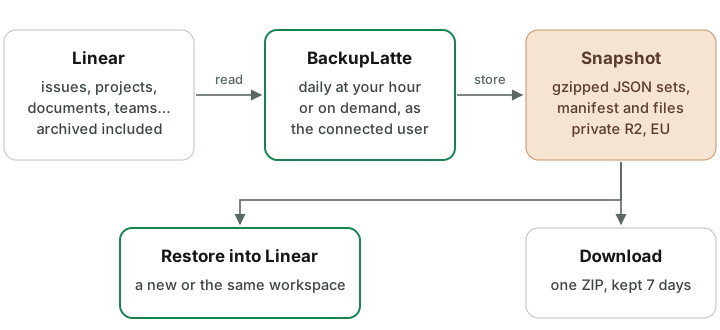
BackupLatte reads your Linear workspace through Linear's API, stores each run as a self-contained snapshot, and can write a snapshot back into Linear when you ask it to.
Connection
You connect a workspace once, through Linear's own authorisation screen (OAuth). BackupLatte receives an access token for that workspace — never your Linear password — and stores it encrypted. Everything it does in Linear it does as the Linear user who connected it, so a backup holds what that user can see. See Connect a workspace.
A backup run
- Queued. At the top of every hour BackupLatte queues the workspaces whose daily hour has come. A workspace that already has a backup waiting or running is skipped, and so is one whose owner has no active plan. Run backup now queues a backup straight away.
- Collected. The worker reads every set of the workspace — issues, comments, projects, documents, teams, cycles and the rest — archived records included. Linear limits how fast apps may read; when Linear asks it to slow down, the worker waits and carries on.
- Files copied. Images and files uploaded to Linear that the content links to are copied too. Each file is stored once per workspace and shared by every snapshot that links to it.
- Checked. Linear has no point-in-time snapshot, and people keep working while a backup runs. At the end, records changed during the run are read again, where Linear allows filtering by change time, so the snapshot is consistent.
- Stored. Each set is saved as gzipped JSON, next to a manifest that records, per set, its state, record count, size and SHA-256 checksum.
The backup ends as Success when every set is complete, Partial (with gaps) when some set could not be collected in full, or Failed. A backup with gaps is still stored, and everything complete in it can be downloaded and restored. See Snapshots and downloads.
Every snapshot is complete
Each snapshot holds the whole workspace, not just the changes since the last run, so any snapshot can be downloaded or restored on its own. Files are the exception that keeps storage small: a file already stored for the workspace is not stored again.
Cleanup
Once a day, at 03:00 UTC, snapshots older than the workspace's retention period are deleted — see Retention. Files that no remaining snapshot links to are deleted with them.
Restore
A restore reads a snapshot and creates its records in a Linear workspace you have connected — a new, empty one or the one it came from — in dependency order, from teams to comments. It saves its progress as it goes, so a restore that stops can be resumed without creating anything twice. See Restore.
Where it runs
The application, its database and background jobs run on servers in Germany (Hetzner, Falkenstein). Snapshots and copied files are stored in Cloudflare R2 under its EU jurisdiction. More in Security.
Something missing or unclear? Write to [email protected].